CIO, CTO, CSO, IT Service Management, IT Job Description, Sarbanes Oxley, and IT Salary News
CIO - CTO - CSO News
Disaster Recovery Digest Recent Posts
Disaster Recovery Digest Recent Posts
- more info
- 10 steps to jump start your business continuity planning business continuity planning - 10 steps to jump start your BCP Business Continuity - For many businesses there is some technology component that allows them...
- 10 point checklist for disaster recovery 10 point checklist for disaster recovery HR, Legal and Media Communications Disaster Recovery 10 Point Checklist A list of 10 questions to rank how comprehensive...
- 10 steps to cloud disaster recovery planning Many companies now are including cloud disaster recovery process in their business continuity plans. Janco has found that disaster plans that include the cloud if...
- Business Continuity Planning for Survival Under Stress Business continuity and disaster recovery planning took a real hit in the recession that started in 2008. First many companies reduced the number and intensity...
- 10 Disaster Recovery Lessons Learned 10 lessons learned in Sandy's aftermath on disaster recovery and business continuity The impacts of Hurricane Sandy have crystallized many executives' minds on the importance...
Storage and infrastructcure are required for major system business undertakings
Implementing enterprise applications can be a complex undertaking for IT organizations. Successful deployments depend on high-performance storage systems that are easy to manage and quick to scale.
- CIO IT Infrastructure Policy Bundle (more info...) All of the policies below are included as individual MS Word files and a single PDF file. Electronic forms are all individual documents that are easily modifiable
- Backup and Backup Retention Policy (more info...)
- Blog and Personal Web Site Policy (more info...) Includes electronic Blog Compliance Agreement Form
- BYOD Policy Template (more info...) Includes electronic BYOD Access and Use Agreement Form
- Google Glass Policy Template (more info...) Includes electronic Google Glass Access and Use Agreement Form
- Incident Communication Plan Policy (more info...) Updated to include social networks as a communication path
- Internet, e-Mail, Social Networking, Mobile Device, Electronic Communications, and Record Retention Policy (more info...) Includes 5 electronic forms to aid in the quick deployment of this policy
- Mobile Device Access and Use Policy (more info...)
- Patch Management Policy (more info...)
- Outsourcing Policy (more info...)
- Physical and Virtual Security Policy (more info...)
- Record Management, Retention, and Destruction Policy (more info...)
- Sensitive Information Policy (more info...) HIPAA Compliant and includes electronic Sensitive Information Policy Compliance Agreement Form
- Service Level Agreement (SLA) Policy Template with Metrics (more info...)
- Social Networking Policy (more info...) Includes electronic form
- Telecommuting Policy (more info...) Includes 3 electronic forms to help to effectively manage work at home staff
- Text Messaging Sensitive and Confidential Information (more Info...)
- Travel and Off-Site Meeting Policy (more info...)
- IT Infrastructure Electronic Forms (more info...)
- more info
Winter weather test business continuity plans
The gusting winds, heavy snow, and freezing temperatures associated with winter are normal and often anticipated occurrences throughout most of the worlds cold weather climates. However, not only cold weather locales are vulnerable to extreme winter weather losses. In fact, moderate climate
regions not normally associated with harsh winter weather tend to suffer the most costly losses as they are typically unprepared to endure such conditions.Winter weather events mixed with a lack of preparation can lead to building damage, freeze-up, flood, and business interruption losses. Advance preparation can help to mitigate winter weather impacts on your operations and business continuity.
- more info
Top 10 best practices for effective risk and reputational management
Disaster Recovery and Business Continuity Links
Enhancing organizations' adaptive capacity and resilience through effective decision-making in the recovery phase.


Complex, disruptive, events require sound leadership and an ability to effectively address uncertainty. Applying effective decision-making to meet the challenges created by emergencies and disasters requires leaders to consider and balance their thinking with that of others and to engage in new approaches to emergency decision-making.
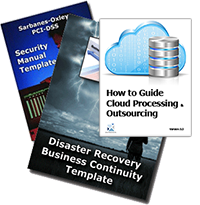
- Disaster Recovery Business Continuity Template
- Disaster Recovery Business Continuity Audit Program
- Disaster Recovery Remote Sites
- Disaster Recovery Business Continuity Template and Security Manual Template Bundle
- Disaster Recovery Business Continuity Template and Security Manual Template Audit Bundle
- Disaster Recovery Business Continuity Template and Safety Program Bundle
- Disaster Recovery Business Continuity Template, Security Manual Template, and Safety Program Bundle
- Disaster Recovery Electronic Forms
- BIA - Business Impact Analysis Methodology
- Compliance with ISO Standards
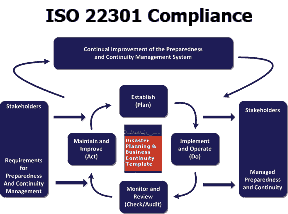
- Compliance with ISO 22301 - Business Continuity Management (BCM)
- Compliance with HIPAA Standards
- more info
IT disaster recovery plan best practices: Fundamentals in DR planning
In an IT disaster recovery plan, the business impact analysis and risk analysis are the foundations upon which actual contingency planning is based. In this SearchStorage.co. Janco focuses on these fundamentals of the DR template with detailed guides to carrying out the necessary research and analysis that will uncover the risks your business faces should disaster strike.- more info
Does a good DR plan improve ROI?
Companies will not see immediate ROI on being prepared for a disaster, but in the event something happens, they will be happy that they took the time to get ready. What would the revenue loss be if the company had an outage for 10, 30 or 90 minutes? How confident is the enterprise in its ability to meet the availability requirements in the SLAs with its clients?
Being prepared allows an enterprise's brand to greatly improve your advertising infrastructure performance and reliability that, in the end, will boost confidence in the brand.
- more info
Small Buisness impacted most when disasters occur
Downtime and data loss caused by natural disasters can be detrimental to any small business. On average, survey respondents said it would take 16 days to recreate or recover their files and nearly a third said they would never be able to recover or recreate all of their important business data if it was lost.
In addition to lost time, data loss can hit a small business where it hurts their bank account. Carbonite found that on average, small businesses would lose $2,976 per day if they were unable to operate. This means the average small business could lose a devastating $47,616 over the 16 days it takes them to recover their data.
More than two-thirds of small businesses have not created a disaster recovery plan and 62 percent of small businesses mistakenly think that any damage caused by a natural disaster would be covered by insurance. In fact, data loss isn't covered by traditional insurance. And even though thousands of small businesses were displaced following Superstorm Sandy, nearly half of small business owners don't have an alternative place they could work from if their work place becomes a disaster zone.
- more info
Disaster Recovery Plan to Business Continuity Plan
You have put a disaster recovery plan in place, with your data backed up and stored, but what do you do in the interim? You need a business continuity plan that reduces downtime.
Disaster Recovery and Business Continuity
A solid business continuity plan needs to be in place before an emergency, whether that's an actual disaster, or just a server outage.
The Disaster Recovery Business Continuity Template provides what you need to consider when creating and implementing a business continuity plan such as:
- more info
- Consistent backup of data to a cloud or localized server
- Seamless reintegration of backup data
- Full server imaging to minimize extra reconfiguring the system
- And more!
Disaster Recovery Audit
A core process that he identified was a Disaster Plan Audit. This Disaster Recovery / Business Continuity Audit program identifies control objectives that are meet by the audit program. There are 36 specific items that the audit covers in the 13 page audit program. Included are references to specific Janco products that directly address the areas the audit covers. This program can be used as standalone audit program or in concert with the following Janco offerings:
- Disaster Recovery / Business Continuity Template
- Security Manual Template
- Security Audit Program Template
- Business and IT Impact Questionnaire
- IT Service Management for Service Oriented Architecture
- Metrics for the Internet and Information Technology
Related posts:
- more info
- Disaster Recovery and Business Continuity Top 10 Disaster Recovery and business continuity are all about being ready for everything. The question that every IT manager and CIO has to answer every day...
- Will your disaster recovery provider be in business when you need them? Disaster Recovery plans that depend on outsourcers face significant additional risk What if your were in Florida and the Hurricane season was in full swing...
- Meeting ISO 27031 Requirements Meeting ISO 27031 Requirements ISO 27031 The ISO Standard defines the Information and Communication Technology (ITC) Requirements for Business Continuity (IRBC) program that supports the...
- Disaster Recovery Plan in the cloud Paper disaster recovery and business continuity plans are difficult to keep up to date and be available for the recovery process. One solution that we...
- Google data center security & disaster recovery This is a great video on physical security as well as the the software security. This is a great primer which all CIOs and Data...
July disaster recap
Impact Forecasting, the catastrophe model development center of excellence at Aon Benfield, has released the latest edition of its monthly Global Catastrophe Recap report, which reviews the major natural disasters that occurred worldwide during July 2013.
The report reveals that strong thunderstorms brought record rainfall to the greater Toronto metropolitan region, resulting in Canada's second billion-dollar natural disaster event of 2013 the first being an extensive flood event that inundated the province of Alberta in June.
No fatalities or serious injuries were reported amid the flooding and power outages, and total economic losses were estimated to approach CAD1.5 billion (USD1.45 billion), with an expectation that roughly half of that cost will be covered by insurance (CAD750 million (USD730 million)).Meanwhile, three stretches of severe weather impacted the United States during the month, comprising highly damaging straight-line winds and hail. Total combined economic and insured losses were expected to reach hundreds of millions of dollars (USD).
Elsewhere during the month, seasonal rainfall swept across several Asian countries:
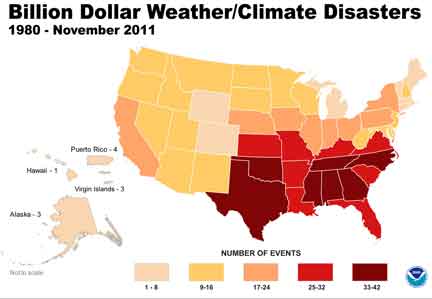
Disaster Recovery and Business Continuity plans need to consider natural weather and events. The effects that natural events have on the environment directly and indirectly may be harmful to people. Forest fires and volcanoes harm air quality. Hurricanes and floods can contaminate water supplies and damage wastewater facilities. Any of these can spread contaminated materials into the environment.
China was among the hardest-hit, with three stretches of severe rainfall killing more than 225 people and causing economic losses in excess of USD1.0 billion.
Monsoon rains prompted renewed flooding and landslides in northern India, killing at least 174 people in the state of Uttar Pradesh.
Elsewhere in Asia, excessive rainfall resulted in dozens of casualties and severe damage across Indonesia, Myanmar, Thailand, Vietnam, Japan, and North Korea.
A magnitude-5.9 earthquake occurred in China's Gansu Province, killing at least 95 people, injuring 2,840 others, and causing total economic losses at CNY20 billion (USD3.25 billion) according to the Ministry of Civil Affairs (MCA), with an estimated 80,000 homes damaged or destroyed.
Also in Asia, a magnitude-6.1 earthquake impacted Indonesia's Aceh Province, killing at least 39 people and injuring more than 2,362 others. The heaviest damage was recorded in the districts of Bener Meriah and Central Aceh, where a combined 16,019 homes and 626 public facilities were damaged or destroyed.
In New Zealand, a magnitude-6.5 earthquake occurred in the Cook Strait causing minor damage across the North and South islands. Four people were injured and the New Zealand Earthquake Commission (EQC) reported that at least 3,128 insurance claims had been filed, resulting in an estimated insured loss of NZD50 million (USD40 million).
Three tropical cyclones affected Asia during July, the costliest being Super Typhoon Soulik, which caused USD460 million in economic damages after making landfall in Taiwan and China. Meanwhile, Typhoon Rumbia caused economic losses of USD177 million in China after affecting the provincial regions of Guangdong, Guangxi and Yunnan; and Tropical Storm Cimaron made landfall in China's Fujian Province, causing an estimated USD253 million in economic damages.
Hurricane Erick skirted the western Mexico coastline, killing two people; while Tropical Storm Chantal degenerated while crossing the Caribbean Sea
- more info
Disaster Planning - Business Continuity Tutorial
Writing and testing a disaster recovery plan is one of the key elements of business continuity management. Traditionally business continuity and disaster recovery (DR) planning have always been separated between the business and the information technology department. It has long been recognised that this divide creates more problems than it solves, after all most businesses could not continue to operate successfully if their IT services were unavailable for a period of time, depending on the nature of your business this may well range from a few hours to several days. The recent launch of BS25999 has established a business continuity management (BCM) standard which intrinsically links BCM, incident management, and IT DR. Essentially the key message is to have true business continuity you must also have strong IT DR capability.
A disaster recovery plan should interface with the overall business continuity management plan, be clear and concise, focus on the key activities required to recover the critical IT services, be tested reviewed and updated on a regular basis, have an owner, and enable the recovery objectives to be met.
- more info
Purchasing a backup generator
How can CIOs estimate increasing electricity use in our data center when purchasing a generator for disasters? CIOs can not afford to purchase something now, have it sit unused for three years and when it is time to use it find that it is no longer adequate.
First, CIOs need to identify all the devices that will be powered by the generator. Determine the power required for each device, in watts, and add these figures to determine the maximum load for the generator.
Second, they need to add an extra 10% to 20% of power output for generator start-up. It may be advisable to enlist the services of an electrical contractor to help you determine your true loads. If you are a tenant in a building, ask the building engineer for power loads needed by the building that may apply to your space when it comes to disaster prep.
Third, estimating changes in power usage over time is an inexact science, but here are some tips.
- Regularly review your power use.
- Examine monthly power usage levels to see if there are seasonal variations that need to be considered.
- When developing three- to five-year strategic plans, determine the potential impact of planned technology and real estate acquisitions (e.g., anything that may require electrical power), and then figure out the affect those things would have on power demands.
- Discuss power planning with your facilities staff, as they will be responsible for procuring power systems and maintaining them when it comes to disaster prep.
- And, if you don't have an electrician on your facilities staff, consider retaining an electrical contractor.
When buying backup power systems as part of your disaster preparations, overestimate the demand by at least 30% to 40%. This way you can provide an emergency power cushion. Finally, have your facilities staff monitor power demand and provide forecasts of any possible unplanned demands that may impact the configuration of backup power supplies.
- more info
Disaster Recovery Strategy
Whether you are a one-man operation or an international corporation, your business relies on a set of core processes used by people in specific roles who require certain IT systems and data. When disaster strikes, these people need to find a way to keep these processes up and running.
But too often, DR strategies focus more on the type of disaster than the particular business processes you need to protect. Focusing on the business instead of merely on the disaster helps to ensure your business can survive many challenges you might never have considered.
This disaster recovery plan template is a road map for how businesses of all sizes can develop an effective business continuity plan designed to minimize the impact of disasters and reduce risk of time, money, valuable data, and reputation.
- more info
After the fact taxes can impact Data Center Recovery Strategy
A story in the Salt Lake Tribune has indicated that a Utah law passed this year has added a 6% tax to the cost of power purchased from Rocky Mountain Power.
Utah Governor Gary Herberts staff received an email expressing the NSA concerns about the new tax, pointing out that it came as a surprise and that stable power prices were one of the major factors that led to the selection of the Utah site. The surprise part was itself surprising, as an attorney for Utah stated that the agency had been informed of the proposed tax before the measure had been signed by the Governor.
With an estimated yearly power bill of $40 million, the tax would add an additional $2.4 million to the operating costs of the datacenter.
- more info
Disaster Recovery Plan Articles
- more info
With Offices Closed, Boston Firms Implement Disaster Plans
A handful of Boston-based companies have implemented disaster recovery plans, primarily due to access restrictions as the FBI and Boston police investigate Mondays terrorist bombings at the Boston Marathon.
Five companies with offices on Boylston Street, where the bombings occurred, have declared disasters and are implementing plans for offsite operations. A number of customers have moved staff to a business continuity center in Marlborough, Mass.
One company that said it had employees working off-site in Marlborough was MFS Investment Management, which was among a number of investment firms in the Boylston Street area that had employees either working from home or from business recovery facilities.
- more info
Disaster Plans need to take Social Media into account
If the organization accepts the use of social media as part of its business operations, it may elect to incorporate social media processes in its emergency communications policies and procedures for both disaster recovery and business continuity situations. For example, in addition to an automated notification system that sends emergency messages and alerts to employees, the company may also designate staff to post messages on various social media sites to extend the effective reach of the message.
How do you balance the business continuity disaster recovery risk and investment equation? Is the potential risk greater than the investment? The facts are:
- 43% of companies experiencing disasters never reopen, and 29% close within two years.
- 93% of businesses that lost their data center for10 days went bankrupt within one year.
- 40% of all companies that experience a major disaster will go out of business if they cannot gain access to their data within 24 hours.
Based on the nature of the incident, however, company management may wish to confer with its internal communications staff as well as its emergency response team to determine if a message going out on social media is desirable, and will not have a negative impact on the firm's reputation and ability to operate. This strategy is particularly important considering that media outlets frequently monitor social media sites for newsworthy stories. Be sure to incorporate social-media-based policies and procedures into business continuity (BC) and DR plans.
- more info
Single vs. multiple recovery sites
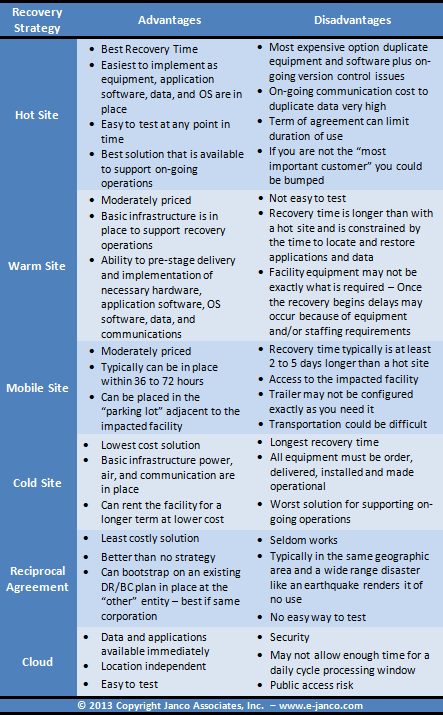
When there are disruptions in the service and the expected service levels are at risk, another metric standard is used: recovery time. The standard defines the allowable time between when the clock starts and stops for the disaster recovery and business continuity processes. If 0-4 hours recovery time is acceptable, then disaster recovery and business continuity should be started at least one to two hours prior to the maximum recovery (four hours).
The benefits of having multile relocation sites is that you have more flexibility and eliminate the potential that a single event takes out both your primary and backup locations. Even if that doesn't happen, multiple sites allows you to spread your risk and your support services like utilities, communications and even food/lodging if required.
The drawbacks in this type of disaster recovery plan are primarily cost and complexity. Trying to maintain support for multiple sites can become difficult and time consuming. Think of the effort of managing, testing and activating a single backup location. You can double that for each additional recovery site you have.
- more info
Core backup and recovery concerns
CIOs and IT Managers need to consider manadated compliance requirements
- more info
- Question that need to be answered are:
- Is our data safe in transit and at rest?
- What prevents hackers from gaining access to our data?
- Is our data properly handled, stored, and deleted?
- Who can access our data?
- What are the benchmark measurements?
- Is our data backup strategy compliant?
- Will our recovery be successful?