CIO, CTO, CSO, IT Service Management, IT Job Description, Sarbanes Oxley, and IT Salary News
CIO - CTO - CSO News
IT Infrastructure Archieture
Business leaders now understand that digital is central to their business and success. They are grasping that fact that their customers, products, and competitors are now fundamentally digital. Their operations and insights are digital. Digital business promises to usher in an unprecedented convergence of people, business, and things that disrupts existing business models. While 74% of business executives say their company has a digital strategy, only 15% believe that their company has the skills and capabilities to execute on that strategy. A piecemeal strategy of bolting on digital channels or methods is no longer sufficient.
Enterprise IT Infrastructure Architecture Framework
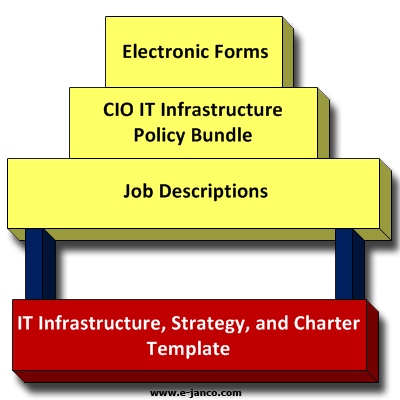
The foundation of Janco framework is its IT Infrastructure, Strategy, and Charter which provides the overall structure
- more info
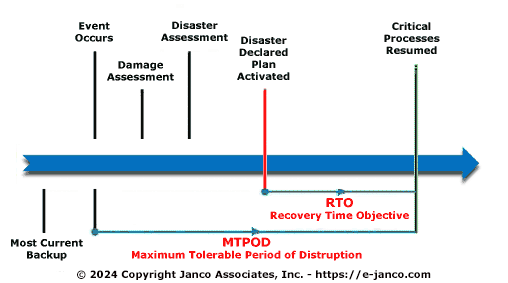
RTO and SRO defined
RTO is the maximum length of time a process can go without being performed before there are unacceptable operational, financial, or regulatory impacts (et al). A service recovery objective is how soon the business continuity or disaster recovery plan must be implemented in order to fulfill the RTO (management defined recovery objectives). For example, if a call center has a 96 hour RTO, but it will take at least 24 hours to implement the recovery plan, then the SRO is 72 hours. Other organizations may have a different perspective on the term. I'm guessing you can frame the relationship between an RTO and SRO mathematically as X+SRO=RTO where "X" indicates the zero (origin) point of the disruption to operations, SRO indicates the time needed to implement the recovery procedures, and RTO indicates the management defined recovery objective.
- more info
Recent DR study raises a number of concerns
The results of a recent study indicate an urgent need for organizations to make significant improvements to their backup strategies with one in five organizations experiencing back-up failures at least monthly and one in 10 weekly. As a result, 53 percent of organizations plan to make changes to their backup strategy this year. Incorporating cloud storage was the remedy most often cited by these respondents.

Disaster recovery was the area where backup strategies were most under stress:
- 12 percent of respondents predict that they can recover from a site disaster within a couple hours. Cloud storage users were twice as likely to recover in that timeframe (20 percent) as non-cloud storage users (9 percent).
- 63 percent of organizations measure site recovery time in days, with 29 percent requiring four days or more.
- More than half of organizations experience backup failure multiple times a year due to a host of issues from connectivity failure (25 percent), equipment failure (21 percent) or file corruption (18 percent).
As organizations try to minimize the resource commitment required by their backup strategies, the survey found the results on management and maintenance standards alarming. Specifically the report found:
- more info
- 75 percent of respondents are backing up more data than they did last year, and 21 percent are backing up at least twice the data as last year. Only three percent report backing up less data.
- 59 percent of organizations keep backups in only one location, typically a single, physical site.
- Individual applications were at greatest risk, with nearly a quarter of organizations backing up applications less often than monthly and, in some cases never.
Top 10 Best Practices for Omni Commerce and ERP
What level of changes do CIOs expect to see in the way thier organization manage business continuity
Only 16.8% expect no changes in infrastructure and organizational business continuity in 2014.
Almost half (49.6%) expect to see small changes; and a third (33.6%) anticipate large changes in the way their organization manages business continuity.
CIOs expecting to see changes were asked to provide details of the one area that is likely to have the biggest impact on business continuity practices or strategies within their organization. The key trends were:
- 10.3% expect to see a significant increase in testing and/or exercising activities;
- 9.3% will be making major revisions to BCM strategies and/or BCP(s);
- 8.2% will embark on new ISO 22301 alignment, implementation and certification projects;
- 8.2% will be taking a more holistic approach to BCM;
- 6.2% expect Changes in the business / organizational structure;
- 5.2% will be making improvements in incident management processes;
- 4.1% think there will be an increased focus on supply chain resilience / supply chain dependencies;
- 4.1% will be taking a new approach to BIAs or will be making a complete reassessment.
- more info
Trends in Business Continuity according to Continuity Central
Trends that are emerging in terms of the changes that business continuity professionals expect to see include:
- 10 percent are anticipating changes in incident / crisis management processes;
- 8 percent expect to see greater integration with the wider business;
- 5 percent expect ISO 22301 implementation projects to drive change in 2014.
Business continuity budgets
The majority (53 percent) of respondents state that their 2014 spending will be the same as 2013. However more than a third say that their business continuity budgets will be increased: 22 percent state that spending will be higher in 2014 compared to 2013; and 15 percent state that it will be much higher.
Recruitment
Three quarters (77 percent) of respondents believe that their organizations business continuity team will remain the same size in 2014. However a fifth (21 percent) expect the team to grow with new additions being made. Only 2.5 percent of respondents expect their business continuity team to shrink.
- more info
Data Centers are becoing more modular
Many companies are looking for ways to expand its business while also delivering better services to its customers without any added cost. They look at their data centers, which are the backbone of the online services, data hosting and backup services it provides its clients, a significant areas where costs could be trimmed. Traditional fixed-structure data centers often lack energy efficiencies and require a large amount of capital upfront, so many companies are adding prefabricated modular data center to its portfolio.
The modular prefabricated model allows a company to customize each module to match the respective data-center environments that its customers needed. Being able to have four data centers with four different types of cooling systems, for example, is a huge selling point.
Modular data centers come in two forms: containerized or prefabricated. Fitting all software and equipment into a trailer-sized unit, containerized data centers are customized to support a companys specific power conditions or cooling-method needs. Prefabricated data centers are shipped to the customer site with the majority of construction completed offsite; these modules are designed to be deployed within a building or computer-like powered shells.
Containers are more for specific-use cases. For example, the military prefers container data centers, which can easily be moved from one site to another.
- more info
Just in time manufacturing disaster recovery impacts
Just-in-time manufacturing techniques, under which components are delivered to factories for assembly into larger components or final products only as needed, are key to eliminating the cost of carrying inventories of those components. To work properly, just-in-time manufacturing requires careful control of supply chains.
IT supply chains can be precarious in the best of times. But a natural or man-made disaster can snap otherwise efficient supply chains, resulting in shortages and price spikes that could disrupt an entire industry.
The IT industry has already experienced such breaks in the past few years, including the impact of Thailand floods on the hard-drive industry and the impact of a Japanese earthquake on supply of a variety of key components.
How precarious is the global IT supply chain? Here are some of the potential disasters and several examples of real disasters that did impact IT production.
- more info
Business Continuity Plans - Paper or Electronic?
In advisory issued by the US Securities and Exchange Commission (SEC), the Financial Industry Regulatory Authority (FINRA) and the Commodity Futures Trading Commissions (CFTC) Division of Swap Dealer and Intermediary Oversight it was recommended, among other things, that "firms should consider keeping their business continuity plans, contact lists and other necessary documents, procedures and manuals at the alternative site, ideally in paper form in the event that electronic files cannot be accessed."
In response to the above, a survey asked the question:"How important are paper-based business continuity plans?
- 55.6 percent of respondents believe that paper based business continuity plans are essential;
- 24.8 percent say that they are quite important; and
- 19.7 percent say that they are not important.
There was some variation of opinion depending on the size of the respondents organization. 57.3 percent of business continuity professionals in large organizations see paper-based BCPs as essential; this drops to 42.9 percent in medium-sized organizations and 50 percent in small organizations. However, 63.6 percent of those in micro organizations say that paper-based BCPs are essentia
- more info
Setting Business Continuity test conditions
The choice of business continuity exercise test conditions is an important factor in its success, but how do you go about deciding what you should focus on?
Start by determining the top risks for your organization but avoid being influenced by external hype and scare-stories.
For example, in the middle of flu season, it is likely that some people might suggest that an appropriate exercise would simulate a response to an increasing number of influenza cases among workers which escalates into a workforce shortage. I am reminded of the intense focus on pandemic planning during the mid-2000s when there was significant attention given to a strain of avian influenza which rarely is transmitted to humans becoming much more easily transmitted to people and setting off a pandemic; or, the H1N1 (Swine Flu) pandemic of 2009 which drove the World Health Organization to create a lot of anxiety when it raised its pandemic alert level for the first time to phase 5, meaning that a full pandemic was considered imminent. While both are still very much risks today, they became subject to high-levels of media attention but then quickly subsided when the media found something more interesting to follow.
Simple scenarios that have no direct correlation to the risks that concern management only serve to produce superficial exercises that do little to further the development of a business continuity plan and are likely to reduce the value of business continuity management in the organization.
- more info
Cost of Downtime is High
The average yearly cost of downtime is $880,000 for mid-sized businesses.
Having a data disaster recovery strategy in place is critical to ensure business continuity in the event of unexpected disruptions. Implementing such a strategy can be delayed for two reasons: one, it's complicated to evaluate business operations to find critical data that needs to be made available immediately after a disaster, and two, many believe that disaster recovery is just too expensive, particularly for small and medium-size businesses.
Both of these issues create friction that slows down the adoption of disaster recovery strategies and technologies; but being able to recover quickly from a data disaster is more important than ever.
The three main options that a small or medium sized company has when building a disaster recovery strategy are:
- Physically moving tapes or drives offsite.
- Replicating data between offices or to an offsite data center/centre.
- DR-as-a-Service from the cloud.
- more info
Reviews of natural disaster perils that occurred worldwide
The report reveals that late-season winter weather affected much of Europe throughout the month, bringing an extended period of heavy snowfall, sub-freezing temperatures, high winds, ice and flooding. Among the hardest-hit areas were France, Germany and Ukraine, where snow accumulations topped 50cm.
Early total economic loss estimates stood at EUR1.4 billion (USD1.8 billion), including EUR706 million (USD914 million) for France alone. More than 100,000 insurance claims were filed in France, with auto claims surpassing EUR101 million (USD131 million).
Heavy snowfall also engulfed northern sections of Japan between the end of February and early March, with recorded snow depths up to 5.5m seen in Hokkaido and northern Honshu. This resulted in local governments spending more than JPY1.36 billion (USD14.2 million) in clean-up costs.
Multiple winter storms also affected central and eastern sections of the United States, as an early March weather system brought heavy snow and coastal flooding along the Eastern Seaboard. Another system at the end of the month brought nearly 50cm of snow from the Rockies to the East Coast. Total combined economic losses from both systems were cited as less than USD100 million.
A strong derecho event (defined as a long-lived, intense squall line) left widespread hail and wind damage throughout the US Southeast. Mississippi was amongst the hardest-hit states, where at least 18 counties sustained damage. The state insurance department estimated that as many as 50,000 claims would be filed. Total economic losses throughout the region exceeded USD250 million, while insurance losses reached approximately USD150 million.
Preliminary data from the US Storm Prediction Center indicate that only 17 tornadoes touched down during the month, representing the fewest number of March tornadoes in the US since 1978, when 17 tornado touchdowns were also recorded.
- more info
Business Continuity and Disaster Recovery Briefs
Business Continuity and Disaster Recovery Briefs
- 10 Backup Best Practices supplementing a disaster recovery and business continuity solution with the cloud 10 Backup best practices - supplementing a disaster recovery and business continuity back-up solution with the cloud Backup best practices are used by many CIOs...
- Data Center Recovery Strategy Data Center Recovery Strategy driven by cost risk considerations Creating a Data Center Recovery Strategy When considering the impact of the loss of...
- 10 steps to jump start your business continuity planning business continuity planning 10 steps to jump start your BCP Business Continuity For many businesses there is some technology component that allows them...
- 22301 Business Continuity Standard Approved by ISO A new Business Continuity Standard ISO 22301 has been approved by the ISO Technical Committee to replace the current BS 25999 standard on Business Continuity....
- Best of Breed Disaster Recovery Business Continuity Best of Breed solutions for disaster recovery and business continuity has four key components: High Availability Best of breed requires service that have high...
Other Articles:
- more info
Disasters have long lasting economic impact
Japan's economy contracted between July and September, official data showed Monday, reversing two previous quarters of growth and underscoring fears that its post-disaster recovery has stalled.
Factory output in the world's third-largest economy has slowed and Japan recorded its worst September trade figures in more than 30 years as weakness in Europe, a strong yen and a territorial dispute with China hit exports.
The Cabinet Office said the economy of Japan, hammered by last year's quake-tsunami disaster, shrank 0.9 percent in the September quarter from the previous three months, a result largely in line with market expectations.
On an annualised basis -- which shows how the quarterly data would look if it were maintained for a full year -- the economy contracted 3.5 percent, it said, as exports slipped and demand among Japanese consumers also slowed.- more infoData Center Recovery Strategy

Planning for weather related business interruptions
Hurricanes, tornadoes, storms, flooding and other severe weather events are an unavoidable fact of life. In the last 12 months, severe weather caused more than $120 billion in damages within the United States alone. Weather can result in significant financial losses for your organization, and even loss of life.
Planning and preparedness are essential for a company to protect its assets, operations, employees, brand and reputation.
- more info
Cloud Distaster Planning Articles
- 10 steps to cloud disaster recovery planning Many companies now are including cloud disaster recovery process in their business continuity plans. Janco has found that disaster plans that include the cloud if...
- 10 Backup Best Practices supplementing a disaster recovery and business continuity solution with the cloud 10 Backup best practices - supplementing a disaster recovery and business continuity back-up solution with the cloud Backup best practices are used by many CIOs...
- Cloud storage aids disaster recovery and business continuity Cloud Storage is a next step to implement after the disaster recovery plan is created Cloud storage is a next step after the CIO creates a...
- Cloud as part of disaster planning Cloud as part of disaster planning VARs and service providers are seeing that providing physical media to end users upon first backup and on an...
- 10 best practices for cloud disaster recovery Cloud Disaster Recovery 10 Best Practices Creating out a complete cloud disaster recovery infrastructure can be cost prohibitive for many organizations. Ten best practices are:...
- more info
5 Tips for DR and BC Managers
Tips for DR and BC Managers:
- How to Evaluate your Disaster Recovery Plan Evaluating your disaster recovery plan To ensure the protection of your critical data, applications, and the continuous availability of your network, you must look at...
- 10 Commandments of Disaster Recovery and Business Continuity 10 commandments of disaster recovery and business continuity planning As requirements for avoiding downtime become increasingly stringent, administrators need tools and platforms that can help...
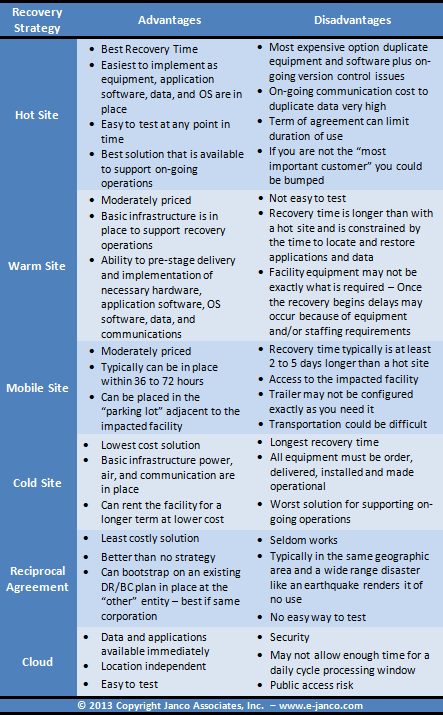
- Options for a data center disaster recovery strategy Data Center disaster recovery strategy options A critical component of a disaster recovery business continuity is the data center disaster recovery strategy Hot...
- 10 Characteristics of a Good Business Continuity / Disaster Plan 10 Characteristics of a Good Business Continuity / Disaster Plan Most organizations have a Business Continuity / Disaster Recovery plan but how can you recognize...
- Should Disaster Recovery Plans Depend on SSD Storage Can Disaster Recovery Plans depend on SSD storage Disaster Recovery depends on stable storage of data and modern storage technology (SSDs, No-SQL databases, commoditized RAID...
- more info
10 commnadments of disaster recovery and business continuity planning
As requirements for avoiding downtime become increasingly stringent, administrators need tools and platforms that can help them plan, design, and implement disaster recovery strategies that can meet those needs.
- Analyze single points of failure: A single point of failure in a critical component can disrupt well engineered redundancies and resilience in the rest of a system.
- Keep updated notification trees: A cohesive communication process is required to ensure the disaster recovery business continuity plan will work.
- Be aware of current events: Understand what is happening around the enterprise - know if there is a chance for a weather, sporting or political event that can impact the enterprise's operations.
- Plan for worst-case scenarios: Downtime can have many causes, including operator error, component failure, software failure, and planned downtime as well as building- or city-level disasters. Organizations should be sure that their disaster recovery plans account for even worst-case scenarios.
- Clearly document recovery processes: Documentation is critical to the success of a disaster recovery program. Organizations should write and maintain clear, concise, detailed steps for failover so that secondary staff members can manage a failover should primary staff members be unavailable.
- Centralize information - Have a printed copy available: In a crisis situation, a timely response can be critical. Centralizing disaster recovery information in one place, such as a Microsoft Office SharePoint® system or portal, helps avoid the need to hunt for documentation, which can compound a crisis.
- Create test plans and scripts: Test plans and scripts should be created and followed step-by-step to help ensure accurate testing. These plans and scripts should include integration testingsilo testing alone does not accurately reflect multiple applications going down simultaneously.
- Retest regularly: Organizations should take advantages of opportunities for disaster recovery testing such as new releases, code changes, or upgrades. At a minimum, each application should be retested every year.
- Perform comprehensive recovery and business continuity test: Organizations should practice their master recovery plans, not just application failover. For example, staff members need to know where to report if a disaster occurs, critical conference bridges should be set up in advance, a command center should be identified, and secondary staff resources should be assigned in case the event stretches over multiple days. In environments with many applications, IT staff should be aware of which applications should be recovered first and in what order. The plan should not assume that there will be enough resources to bring everything back up at the same time.
- Defined metrics and create score cards scores: Organizations should maintain scorecards on the disaster recovery compliance of each application, as well as who is testing and when. Maintaining scorecards generally helps increase audit scores.
- more info
Disaster Recovery Planning a critical mandate
Business continuity and disaster recovery (BC/DR) planning is a critical mandate for all companies and especially for small and midsized businesses, where the cost pf downtime and/or lost data can be devastating. It does not take a cataclysmic event to cause major disruption the untimely loss of a critical server or file for even a few hours can be extremely costly in today's highly competitive 24x7 business climate.If you have implemented virtualization - cloud computing, you already know how this powerful technology can save you money on IT costs via server consolidation. But are you aware that the benefits of virtualization extend beyond IT cost savings, and that virtualization can also keep your business running through many types of planned and unplanned IT outages?
Many regulations require companies to support more stringent availability standards. Several new acts and regulations, directed at specific industries or a broad cross-section of companies, mandate the protection of business data and system availability. Businesses may incur financial or legal penalties for failing to comply with these data or business availability requirements.
- more info
Disaster Recovery Concerns
Unplanned IT and telecom outages is the leading cause of concern with 70% of respondents of a Business Continuity Institute (BCI) study are extremely concerned or concerned, followed by data breach (66%) and cyber attack (65%).
The top 10 threats rated by level of concern in the survey are:
- more info
- Unplanned IT and telecom outages 70% extremely concerned or concerned
- Data breach 66% extremely concerned or concerned
- Cyber attack 65% extremely concerned or concerned
- Interruption to utility supply 50% extremely concerned or concerned
- Security incident 47% extremely concerned or concerned
- Adverse weather 53% extremely concerned or concerned
- Supply Chain Disruption 39% extremely concerned or concerned
- Fire 37% extremely concerned or concerned
- Health & Safety incident 37% extremely concerned or concerned
- Act of Terrorism - 33% extremely concerned or concerned